Back to Code
Overview
A studio session ends when the command stops. There are two ways to keep what you tuned: Copy as code writes the orbitals as Python to paste into your atom, and a preset saves the session's changes in a file that the studio can apply again, from the page or when it starts. Your code stays the source of truth in both: the studio never changes your code, and a preset is a layer over the atom from your code, never an atom of its own.
Copy as Code
Copy as code, at the foot of the drawer, shows the atom's two orbital lists as they are in the session, with the imports they need. Paste the lists over input_orbitals and output_orbitals in your atom; the rest of the atom is not written, because the studio does not change it.
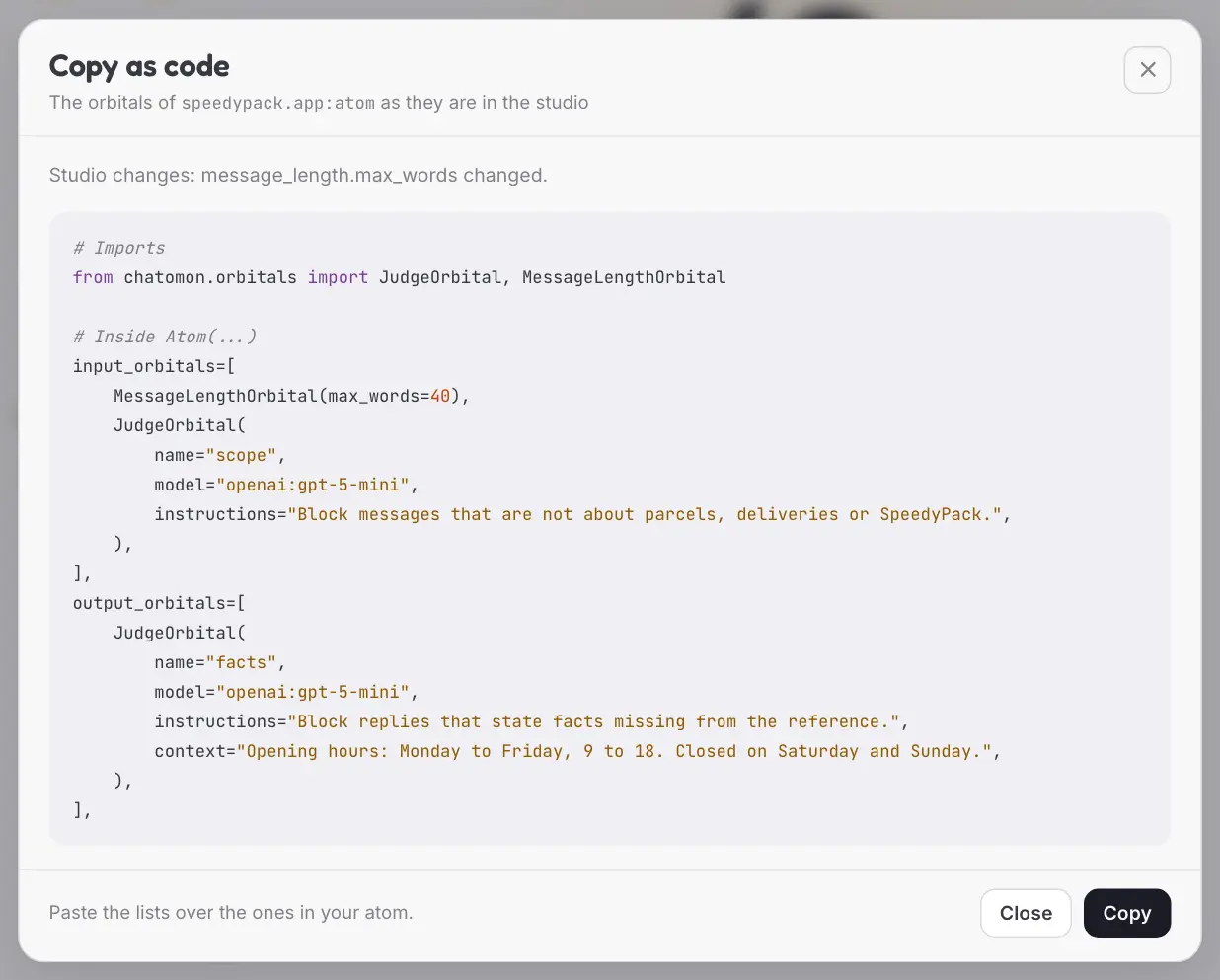
A session with more changes reads like this:
# Imports
from chatomon.orbitals import JudgeOrbital, MessageLengthOrbital, TurnLimitOrbital

# Inside Atom(...)
input_orbitals=[
    MessageLengthOrbital(max_words=80),
    TurnLimitOrbital(max_turns=8, warn_before=2),
    # Off in the studio:
    # scope,
    no_refunds,
],
output_orbitals=[
    faithfulness,
    JudgeOrbital(
        name="tone",
        model="openai:gpt-5-mini",
        instructions="Block replies that are rude or off-brand.",
    ),
],
The studio sees the objects your code built, not your source, so it writes each orbital in one of three ways:
| The orbital | Is written as |
|---|---|
| From your code, untouched, held by a variable of the atom's module | That variable's name, such as no_refunds |
| One of chatomon's own that was edited, added, or built inline in your list | A constructor call with the arguments that differ from the defaults |
| Anything else | ... and a comment that names the orbital to keep from your code |
An orbital that your code puts in both chains is one object. When the studio writes it as a call, it assigns it to a variable under # Before the atom and uses that variable in both lists, because two calls would build two orbitals with one name.
An orbital that is off stays in its place as a comment. An argument that is an object is written with its variable's name when the module has one, otherwise as .... The card lists every ... it wrote, so nothing is left out silently.
A block is written as a call of its type, with the fields that differ from the type's defaults and the import of the type. A block your code holds in a variable is written with that name for as long as you did not change it.
# Imports
from chatomon.orbitals.principled import ApiBackend, ScopeGuardOrbital
from orbitals.types import AIServiceDescriptionV2

# Inside Atom(...)
input_orbitals=[
    ScopeGuardOrbital(
        guard=ApiBackend(api_url="https://scope.example.run.app", api_key_env="SCOPE_KEY"),
        description=AIServiceDescriptionV2(
            identity_role="Customer assistant of SpeedyPack",
            context="Customers ask about their shipments.",
            constraints=["Never discuss refunds"],
        ),
    ),
],
The code names the variable that holds a key, never the key. What the studio cannot edit, such as a mapping or a headers provider, is added by hand next to the block.
Two situations produce more of them:
- The studio was started with
serve(). It has no module to look names up in, so@orbitalfunctions and objects from your code cannot be named. Start it with thechatomon studiocommand to get names. - Objects are created inline or inside a function, as in an atom built by a factory: they have no variable in the module.
An atom built with the copied lists has orbitals with the same fingerprints as the session, in the same order. The fingerprint is what turn reports record, so reports from your application match the turns you tried.
After pasting the lists, reload the code: what your code now has is no longer a change of the session, and the foot of the drawer says the session is the same as your code.
Presets
A preset is a JSON file with the session's changes: which orbitals are on, their order, the settings you changed on the orbitals from your code, and the orbitals you added. It holds no clients, no connectors and no credentials: a connection is saved with the address of its service and the name of the environment variable that holds the key. It does hold the text you typed, such as a judge's instructions.
Export preset shows the file, copies it, or downloads it as <atom name>.preset.json. Import preset takes a file or pasted text and replaces the changes of the session with the preset's; Undo brings them back.
Applying a preset starts from the atom as your code defines it now. Settings the preset does not mention keep the values of your code, so a preset made last week does not undo what you changed in the code since.
Format
{
  "chatomon_studio_preset": 1,
  "chatomon": "0.1.0",
  "atom": "speedypack",
  "input_orbitals": [
    {"name": "message_length", "kind": "MessageLengthOrbital", "from": "code",
     "enabled": true, "settings": {"max_words": 80}, "fingerprint": "sha256:…"},
    {"name": "scope", "kind": "FunctionOrbital", "from": "code",
     "enabled": false, "fingerprint": "sha256:…"}
  ],
  "output_orbitals": [
    {"name": "tone", "kind": "JudgeOrbital", "from": "studio", "enabled": true,
     "settings": {"model": "openai:gpt-5-mini", "instructions": "…"},
     "fingerprint": "sha256:…"}
  ]
}
| Field | Meaning |
|---|---|
chatomon_studio_preset |
The version of this format. This studio writes and reads version 1 |
chatomon |
The chatomon version that wrote the file, for information |
atom |
The name of the atom the preset belongs to |
input_orbitals, output_orbitals |
The chains, in order |
name, kind |
The orbital's name and class |
from |
code for an orbital your code defines, studio for one added in the studio |
enabled |
Whether the orbital is on |
settings |
For code, only the settings that differ from your code; for studio, every setting. Optional. A value is plain or a block |
fingerprint |
The orbital's fingerprint when the preset was exported |
A block is written whole: one text as a string, a value with fields of its own as its type and the fields that differ from the type's defaults. For an orbital from your code, changing one component of a description saves the whole description.
{"name": "scope_guard", "kind": "ScopeGuardOrbital", "from": "studio", "enabled": true,
 "settings": {
   "guard": {"type": "ApiBackend",
             "fields": {"api_url": "https://scope.example.run.app", "api_key_env": "SCOPE_KEY"}},
   "description": {"type": "AIServiceDescriptionV2",
                   "fields": {"identity_role": "…", "context": "…"}},
   "history_window": 6, "timeout": 30.0, "on_error": "block"},
 "fingerprint": "sha256:…"}
Problems and Notes
A preset that cannot be applied is refused whole: nothing changes, and the card lists one message per problem.
| Problem | Example |
|---|---|
| Not a preset | Text that is not JSON, or has no chatomon_studio_preset |
| Another version or another atom | A version this studio does not read; an atom that is not the one loaded |
| A malformed entry | A missing field, a field of the wrong kind, a key the format does not have |
| An orbital your code no longer defines | A code entry whose name is gone, or is now another class |
| An orbital that cannot be added | A studio entry of a class that needs objects, or on a side it does not support |
| An orbital whose extra is not installed | A studio entry of a class the studio does not find; the message names the extra to install |
| A block that does not fit | A type the argument does not accept, or a field the type does not have |
| A variable that is not set | A connection that names an environment variable the studio's environment does not have |
| A connection, on a network address | A preset imported in the page that sets where an orbital connects, while the studio listens on a network address: give it when the studio starts |
| A name or a value that is not accepted | A name used twice, a setting the orbital does not have, a value its constructor refuses |
| A chain the atom refuses | An orbital turned off while another reads its annotations |
A preset that can be applied but does not reproduce the exported session is applied with notes:
- An orbital differs from the exported one. Its fingerprint is not the one in the file: your code, or chatomon, changed since the export. The preset's own settings were applied.
- An orbital of your code is not in the preset. It was added to the code after the export. It is placed at the end of its chain and left on: a guardrail in your code stays active until you turn it off.
A preset that sets where an orbital connects is applied with a note for each connection, listed apart from the others. The note shows the whole connection, as Copy as code would write it; a letter that is not ASCII is written as an escape, so an address cannot be made to look like another.
- The connection names an environment variable.
'scope_guard' uses the environment variable SCOPE_KEY: guard=ApiBackend(api_url="https://…", api_key_env="SCOPE_KEY"). Check where it points before you send a message. - The connection names no variable.
'scope_guard' names no environment variable for its key: guard=ApiBackend(api_url="https://…"). Its client can still send a key it reads from the environment on its own. Check where it points before you send a message.The client of theorbitalslibrary does so: it sendsPRINCIPLED_API_KEYwhen that variable is set.
A preset decides where a key and the conversation are sent. A file that gives an address makes the studio send there, at the first turn, the messages the orbital reads and the key of the variable it names, or PRINCIPLED_API_KEY when it names none. Apply only presets you trust, as you would run only code you trust, and read these notes when a preset comes from someone else: in the page they are in the card that follows the import. At a start with --preset they are printed in the terminal before the link, and the page shows them in a card when it opens, until those notes have been read in that browser.
Starting with a Preset
The studio can start with a preset already applied, so a tuned session comes back after a restart without going through the import card. Give the command the file:
chatomon studio speedypack.app:atom --preset speedypack.preset.json
From Python, serve takes the same path as preset=. The path is relative to the current directory or absolute, and the file can be anywhere, such as the folder your browser downloads to.
The preset goes through the same checks as an import in the page, and the answers arrive in the terminal:
| The preset | What happens |
|---|---|
| Has problems | The studio does not start. The command prints one line per problem and exits with code 1; serve raises a ChatomonConfigError with the same lines |
| Is applied with notes | The studio starts, and each note is printed before the link. The notes about connections are also shown by the page when it opens |
| Cannot be read | The studio does not start: the file is missing, or is not UTF-8 text |
The session begins with the preset's changes: the drawer counts them against your code, and there is nothing to undo yet. Reset to code goes back to your code as always, and Undo then brings the preset's changes back.
The file is read once, when the studio starts. To apply a file you changed later, restart the studio or use Import preset.
Key Components
| Component | Location | Purpose |
|---|---|---|
Orbital.fingerprint |
src/chatomon/orbitals/base.py |
The hash of an orbital's configuration that Copy as code preserves and presets record |
Orbital.default_name |
src/chatomon/orbitals/base.py |
The name an orbital has by default, left out of the generated code |
serve, chatomon studio |
src/chatomon/studio/server.py, src/chatomon/_cli.py |
Start the studio, with a preset when preset= or --preset names one |
Related Documentation
- Tuning Orbitals — the changes these two features carry
- Reloading the Code — loading your code again once the copied orbitals are in it
- Saving a Turn as a Test — a test for a turn you tried, which passes once the copied orbitals are in your code
- Studio — starting the studio with the command or with
serve() - Observability and Audit — fingerprints in turn reports
Last Updated: October 2026 Status: Implemented